Connecting
Prior to accessing organizational resources, you will need to connect to the secure VPN tunnel. To do so:
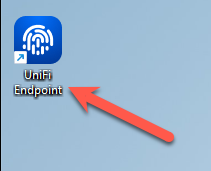
- Launch the UniFi Endpoint app
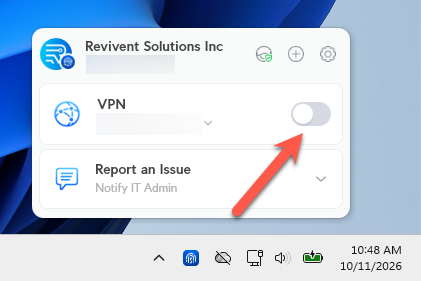
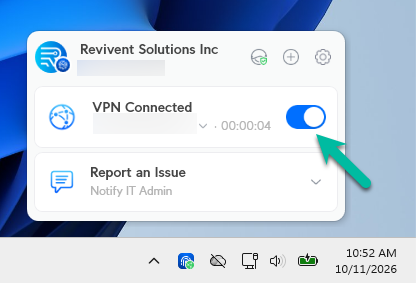
- In the lower right hand corner of your screen, you should see your organization's VPN. Toggle the conncetion switch on
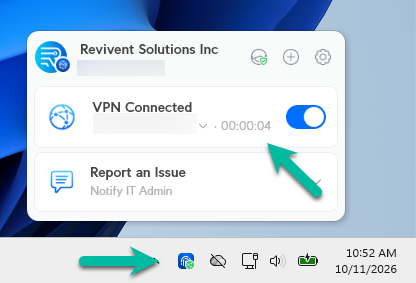
- Once connected, the toggle will turn blue, and you will see a timer denoting how long your session has been connected. You will also see a green indicator dot on the UniFi Endpoint Tray Icon
Disconnecting
Once you have completed your work, it is best practice to disconnect from the VPN. To do so:
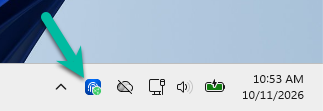
- Locate and select the UniFi Endpoint icon in the lower right-hand corner of your screen
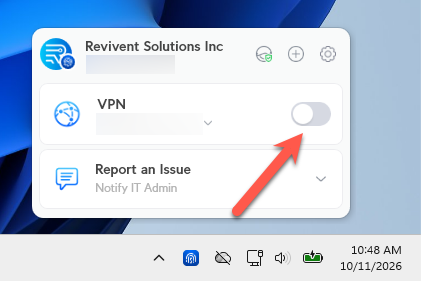
- Toggle the connection off
- Once the connection has been terminated, you will see the toggle switch return to a greyed out color
Was this article helpful?
That’s Great!
Thank you for your feedback
Sorry! We couldn't be helpful
Thank you for your feedback
Feedback sent
We appreciate your effort and will try to fix the article